
✨ New Features
We have built a new export format for manuscript submission. Pick it from the file type dropdown to export a Word doc laid out exactly as agents and editors want it (Times 12pt, double spaced, title page with your contact details and word count, numbered chapters, etc). It remembers your page size and contact details for next time. See the full details here.
🚀 Collaboration Is Here (in Beta)
Writing is often a solo job, but plenty of you have told us about the co-authors, editors, and beta readers who are part of your process. So we set out to build a space where they can join you on your writing journey, in a way that fits seamlessly into your writing life.
From today, you can invite people into your project inside Novlr, choose exactly what each of them can do, and write and comment together in the same place.
Share your project with people
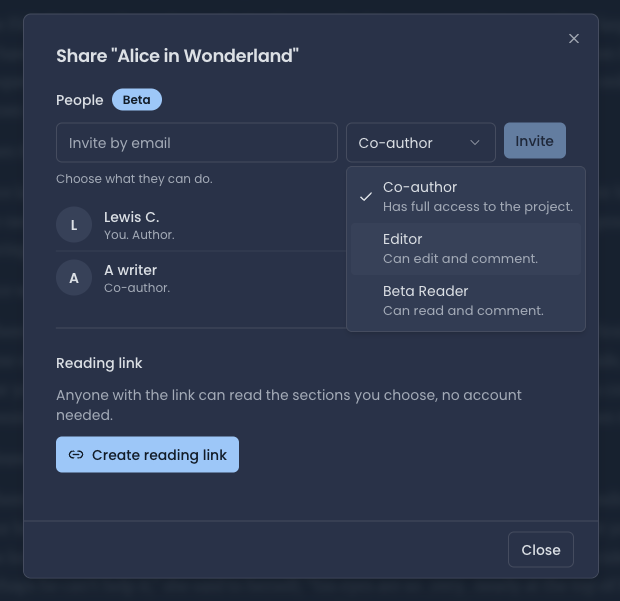
Open the Share dialog on any project and you'll find a new People section, (marked Beta). Type an email address, choose a role, and hit Invite. You'll see everyone with access to the project listed underneath, with their role next to their name.
Choose what each person can do
Every invitation comes with a role:
Co-author: has full access to the project.
Editor: can edit and comment.
Beta Reader: can read and comment.
Write together
Co-authors and editors can work in the same chapter at the same time, live.
What your invitee sees
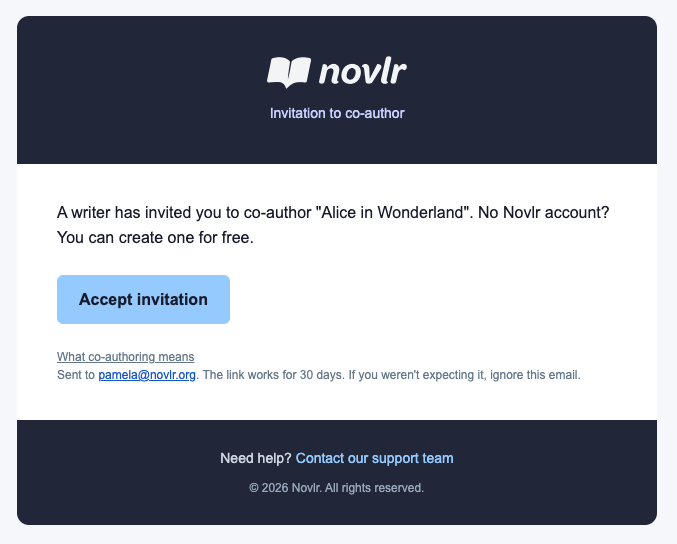
Your invitee receives an email telling them they've been invited to co-author your project, with an Accept invitation button. If they don't have a Novlr account yet, they can create one for free. The link works for 30 days, and the email includes a link explaining what co-authoring means.
Comment on any line
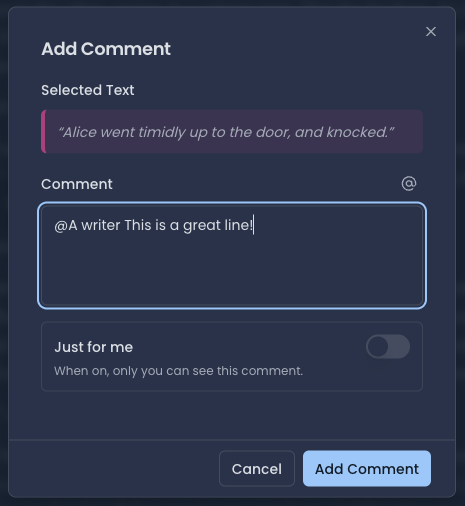
Select any passage in the manuscript and add a comment. Type @ to mention someone you've shared the project with, and reply to their comments to carry the conversation on. If you don't want to share a comment right now, switch on Just for me and it stays completely private, even if the project is shared.
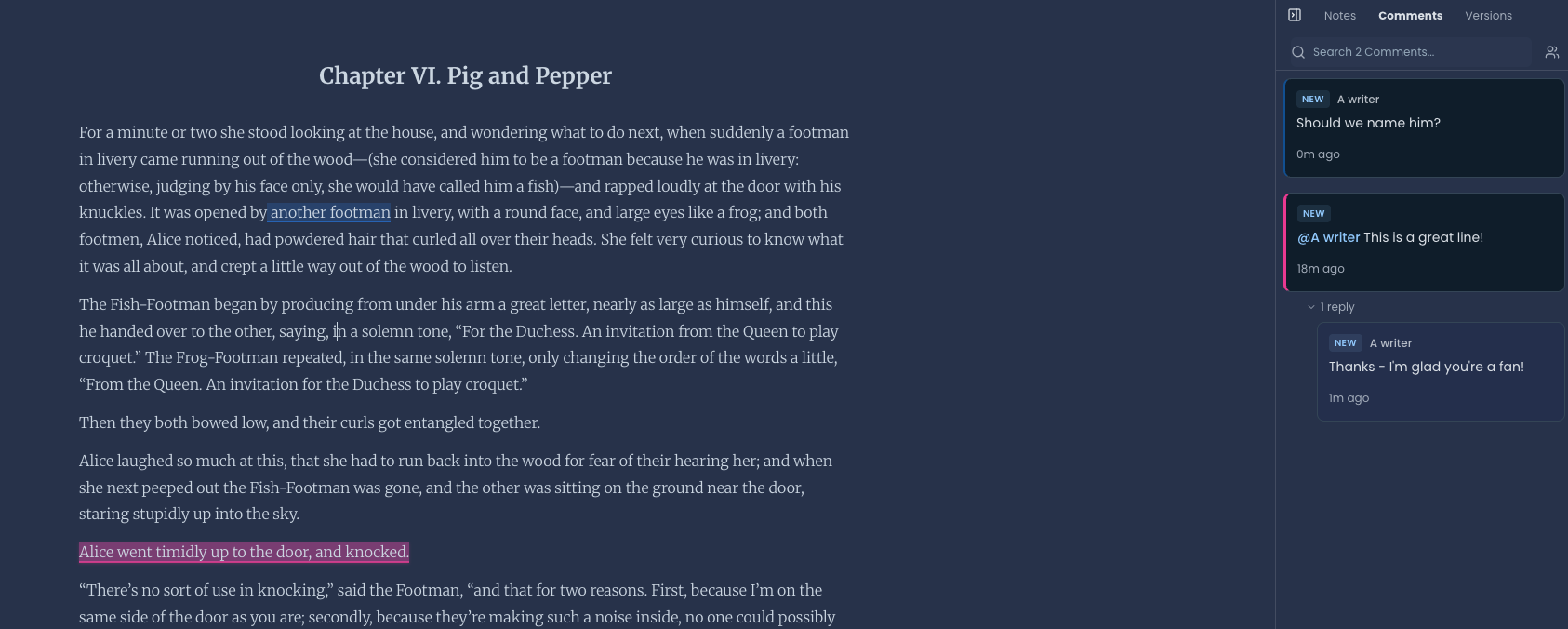
Comments live in the Comments tab of the sidebar, next to Notes and Versions. The commented text is highlighted in the manuscript, and you can search your comments from the same panel.
If someone just wants a quick read, you can still create a reading link and anyone with it can read the sections you choose, no account needed.
Getting started
Open your project and click Share.
Under People, type an email address.
Choose Co-author, Editor, or Beta Reader.
Click Invite.
Select a line in the manuscript and add a comment, using @ to mention someone.
Tell us what you think
Collaboration is in beta and open to everyone, on every plan, including Free. Our co-owners have been putting it through its paces and have already helped us make it better, and there will be more to improve as more of you try it, which is why this is a beta release for now.
If something's broken, confusing, or just a bit rough around the edges, please tell us. If something made you smile, tell us that too. Message us through the in-app chat to share you feedback. We read every message!
🪡 Improvements
In the share snippet, "Serif" and "Sans" are now always our brand fonts: Merriweather and Poppins.
Sharing the snippet from your phone opens in the first tap, and downloads instantly.
The share snippet preview now fits on smaller phone screens.
You can now remove the words showing it was proudly "written in Novlr" from the share snippet (on paid plans).
The in-app journey and wording for exporting a single section, and for moving between exporting a section and the whole project, are clearer.
🪲 Bug Fixes
The share snippet preview now matches the downloaded image exactly, in every ratio, with no more different line breaks in portrait or landscape.
Fixed the random blank line that sometimes appeared near the bottom of the shared image.
✨ New Features
Collaboration is going into beta testing.
You can now change the orientation of the planning grid. There's a small toggle top right: sections across the top (the original) or sections down the side. Your choice is remembered on your account.
🪡 Improvements
To reduce clutter in the planning grid, we removed the red icon on the cards (and put it once in the header) and removed the "edited 3d ago" text, which you told us wasn't useful.
Card previews now show three lines of your note instead of two.
The notebook side panel has gone from the Planning tab. It was clutter; your other notes are in the Notebook and still accessible from the notebook side panel with your manuscript open.
Tags now look the same everywhere: the grey italic chip you see in Edit Tags. The blue bold chips on the new note dialog and the bold filter chips are gone.
Planning note cards in the sidebar have been neatened up.
🪲 Bug Fixes
The share modal can now be scrolled on mobile devices.
Epub downloads not pass validators and accissibilty checks without any errors.
🪡 Improvements
Font size can be set as a global default and at a project level.
Messages when something fails or you haven't got permission for something have been improved.
A Beta Reader role has been added to the Collaboration feature (only available to co-owners, for now).
🪲 Bug Fixes
Novlr Academy now shows all courses on our website rather than requiring you to be logged in to preview.
The keyboard shortcut for showing the right panel (Cmd+Shift+\) on Mac is now working.
Section headers are no longer cut off when you widen the left-hand sidebar.
✨ New Feature
The first iteration of collaboration is now live for co-owners, ready for testing and feedback.
🚀 Big Releases
Writing preferences are now set per project. Font family, font size, line spacing, paragraph indent and the space between paragraphs now belong to each project rather than your whole account.
To change your settings, open the project menu (the three dots at the top of your manuscript) and choose Writing Preferences to set how that project looks in your editor and in your exports. Existing projects keep exactly the settings you had, so nothing changes until you choose to change it, and new projects start with sensible defaults for what they are: a novel opens indented with no gaps, a script in a monospaced font, an article with gaps and no indent, and poetry with neither. Curly quotes and typewriter mode still apply globally, under Editor Behaviour in your account preferences.
🪡 Improvements
Exports and reading links now match your manuscript. Your paragraph indent and spacing carry into every export format, not just Word: EPUB, PDF, ODT and RTF too. Reading links you share show your chapters with the same indent, spacing and line height you see in the editor, and the export dialog's line height now starts on your project's setting.
✨ New Feature
You can now choose how your paragraphs are laid out. In Preferences → Formatting, next to "Indent paragraphs," you'll find a new setting: Space between paragraphs. Turn the gap between paragraphs on or off.
With it off, your writing uses normal line spacing between paragraphs, which makes dialogue read much more naturally. If you keep the paragraph gap on, we've also made the gap itself smaller. It used to be a full blank line; now it's a subtler gap, closer to what Word gives you.
Exporting to .docx will also follow your indent settings (other export formats still to come).
If you already indent your paragraphs, the gap is now off by default, since books typically use one or the other, not both. If you'd like both, just switch the gap back on in your preferences.
You can also now choose between 1.0, 1.15, 1.5, or 2.0 line height and have it apply to your whole manuscript. 1.5 is the default, so your manuscript looks just as it did before if you don't want anything to change.
🪡 Improvements
The Desk's Writer's Wisdom card, which adds a daily dose of writing advice, is now filled with new advice from 50 great authors, from Toni Morrison to Mark Twain. Find it in your desk cards if you've customised your layout.
🪡 Improvements
The new Planning feature and Novlr Sites are both featured on the home page.
🪲 Bug Fixes
Fixed broken images not displaying properly on the home page.
All-time word count and words-written graphs now show the full history without dropping off the newer analytics.
Backups, exports, duplicates, and Scrivener imports now handle very large projects (over a thousand sections or notes) in full.
Each switch on the Notifications tab now saves on its own, so changing one preference never accidentally changes another. Newsletter preferences also carry over correctly when you change your email address.
The account page now opens properly from Novlr Sites.
Co-owners see their co-owner number on the plan box whatever plan they're on.
🔒 Reliability & Security
A batch of reliability work on how we store account and preference data, so settings remain persistent.
💳 Billing & Subscriptions
Sites subscribers can now manage billing directly from the pricing page.
🪡 Improvements
Small polish to the app header height so icons and menus sit more comfortably.
Following a link straight into your account settings, slike the one after checkout or in our emails, now opens the settings panel as soon as you arrive.
Course and Academy Course have been merged as project types and are now available from the project type selector.
🪲 Bug Fixes
The parchment theme's paper texture now continues all the way down your manuscript instead of stopping after the first screen, and the grain is finer.
Fixed the Novlr logo being slightly cut off in the sidebar, and aligned it neatly with the app header.
The sidebar and header now share a clean, consistent divider line in every theme, where it was previously invisible or mismatched in some.
Short story now shows as a project type in the selector when creating a new project.
The project status will now show all available, rather selecting a random ten to display on selection.
🪡 Improvements
Getting around the Planning grid with a mouse is now much easier: click and drag any empty part of the grid to move around in any direction, the scrollbars are bigger and easier to grab, and if your grid only stretches sideways, your scroll wheel now moves it sideways too. You can also click the grid and scroll with your arrow keys. Trackpads, tablets and phones work exactly as they did before.
Show/hide planning notes in notebooks now persists. The app remembers whether you last had it checked or unchecked, so it's more likely to be selected the way you need it.
🪲 Bug Fixes
New notes no longer copy the note before. If you created a few notes back to back, your new note was picking up the text of the previous one. Every new note now starts properly blank.
Switching notes could sometimes overwrite one note with another's text. In some cases, switching straight from one note to a much shorter one could leave the first note's text on screen and then save it over the note you'd just opened. That's now fixed.
✨ New Features
There is a new Invite friends tab in your account settings. Inside it you will find your own invite link and a short code. Copy either, share the link straight from your phone, or type in a friend's email address and we will send the invitation for you.
When a friend signs up through your invite they appear in your list, and when they subscribe to any paid plan you both get a month of Studio free (co-owners earn 10 credits when an invited writer joins and 40 more when they subscribe).
You will get a note in Novlr and by email when a reward lands, and a reminder a few days before a free month ends.
If you're already a subscriber, any additional time will be added to your account as credit. You can check the status of any credit applied to your account in your account preferences.
🪡 Improvements
A tidier account menu. Account settings now group your account, subscription, and notifications together, with Invite friends and Support in their own Extras section.
🪲 Bug Fixes
Your word count graph now ends on today's total. The graph on your Analytics page finishes on the exact number your manuscript stands at right now, whatever range you're looking at, and the final minutes of every writing session are kept in your history. We've also brought earlier history into line with the counts your sections hold today.
⚡ Performance
Your writing streak now refreshes as soon as the words that hit your target are saved, on every kind of habit, and it does it faster, so the celebration and the streak arrive together.
Novlr does less work in the background while you type, so your word counts, habit card, and analytics stay fresh with far fewer refreshes.
💳 Billing & Subscriptions
If there's credit waiting on your account, the Subscription tab tells you how much and that it comes off your next bill.
🪲 Bug Fixes
Importing a section no longer forces the document to be added as a whole new project.